

Overview
Your first goal is to find a real material around you, take photographs of it from different angles, and then try to replicate its patterns in two shaders.
Appropriate materials
Choose a material that can be used on a flat surface. The material needs to have both a regular pattern (grid, cells, lines, chevrons, etc.) and a stochastic pattern (random noise, dots, lines, gradients that are not visually repetitive). Here are examples of such materials that I randomly photographed at the university:


Make sure to choose your own material and take at least 3 photographs of it at varying angles and distances.
Implementation
Your goal is to implement the material in a shader. The virtual material should be visually similar or at least strongly inspired by the real photos you took. For now, we are only interested in replicating the color texture, not any other properties (glossiness, bumps, etc. will be explored later in Assignment 2).
You must implement the same material twice:
- Once by programming a GLSL fragment shader suitable for real-time rendering. For that, use the provided Three.js template in which you can edit the fragment shader and GUI.
- Once in Blender, using shading node graphs. I strongly recommend to use the visual nodes and built-in functions (checkers, bricks, Voronoi, noise, color ramp, mix, etc.). It is allowed to use Open Shading Language (OSL) for scripting if you want to, but it is not required.
It is up to you whether you start in Blender and then replicate the look in GLSL; or you start in GLSL and then replicate it in Blender.
Additional criteria:
- You must expose at least 3 user-editable parameters.
- At least one of them has to be a color (e.g., base color of the material).
- At least one of them has to be related to size (e.g., size of the patterns).
- In Three.js, please use the GUI class to make the parameters accessible.
- In Blender, please use Group Nodes and their input sockets to make the parameters accessible.
Template
Please visit the study-materials repository. I strongly recommend starting with checkerboard.html (older GLSL versions) or checkerboard_glsl3.html (GLSL 3+), but you might also choose a different starting point (for example one with noise).
Submission
Prepare the following:
- .html file with the Three.js/GLSL shader based on the provided template
- .blend file with a simple plane with the assigned Blender material
- .md or .pdf report with:
- your material photos
- screenshots from Three.js and Blender
- brief explanation of how your shaders work
- declaration whether you used any AI assistants and how much of the work was your own
Upload these to a git repository under gitlab.mff.cuni.cz – each student will get a private repository created by me.
Deadline
The submissions deadline has been extended to Sunday, March 15, 23:59. Please ensure you have committed and pushed your changes by that time.
Grading
- You get 100% if you meet the full assignment instructions.
- You can get extra 25% bonus if your solution is exceptionally good.
- I will apply 50% deduction for each important requirement that was not followed.
Example: You only implemented the shader in GLSL and you did not expose any user-editable parameters → you only receive 50%*50%=25%.
Overview
In this assignment, we will work with view-dependent appearance, in other words, a material model whose appearance changes based on the illumination and camera angles. The goal is to implement a material with whose roughness, specularity, metalicity, etc. varies across the material’s texture (see below). If possible, reuse the material from Assignment 1 that you already photographed. If not possible, photograph a new suitable material.
Real example
Consider how different parts of the following material from Assignment 1 look different when the view angle changes:

While the patterns are rough and look more diffuse, the flat parts between the patterns are very polished and specular.
This is why in Assignment 1, you should have taken at least 3 photographs of your material at varying angles and distances.
Implementation
Similarly to Assignment 1, you are expected to implement the material both in Blender and in GLSL.
Blender implementation
I suggest you start with Blender, which already comes with a specular material node.
Here is an example of a simple shader graph that modulates the base color (diffuse color), specular color, and roughness of a checkerboard. Notice how the golden squares are glossier and have lower roughness than the diffuse white squares.

While roughness is a float, not a color, you can still connect color nodes to it. Blender will simply read the color channels and interpret it as a single float.
One way to map the roughness is to use Color Ramp as above, but you can also use the Map Range node, which maps a float value from range [a,b] to range [x,y]. So for example if you have a texture from [0,1] but you want your roughness to be 0.7 and 0.4, that means you want to map 0→0.7 and 1→0.4, which you can do as follows:

To achieve reasonable appearance, keep in mind that conductors (metals) can have a colorful specular component, but their diffuse color is usually black or dark gray. For dielectrics (such as paper or plastic), you want the specular component to be colorless (only grayscale), while the diffuse color can be arbitrary.
When working with specular materials, it might be useful to switch between environment illumination (which is the default Shading preview) and scene illumination (where by default you have a point light). You can switch between the viewport modes in the top-right corner:

GLSL implementation
In GLSL, the situation is more difficult. In Assignment 1, there was no illumination and the material was just a color. That changes and you now have to implement a specular microfacet BRDF shader that takes the light and view direction into account.
I recommend you to have a look at diffuse.html, which implements a simple diffuse BRDF shader with a point light source whose position you can change in the GUI. You can take this shader as your baseline and then copy-paste your Assignment 1 texture code into it as the vec3 albedo component. As a result, you will get a diffuse BRDF combined with your Assignment 1 material.
Then, you will have to add a microfacet BRDF to the diffuse BRDF component. I recommend to start with something like this:
vec3 f_diff = albedo / PI; // diffuse component
vec3 f_spec = …; // specular microfacet component
vec3 L_o = (f_diff + f_spec) * L_i * NdotL; // outgoing (reflected) light
Remember that a specular microfacet BRDF is essentially:
vec3 f_spec = (D * G * F) / (4.0 * NdotL * NdotV)
To ensure you are not dividing by zero, you might want to write something like:
vec3 f_spec = (D * G * F) / max(4.0 * NdotL * NdotV, 0.001)
The D, G, F components are the normal distribution function (D), masking-shadowing function (G), and Fresnel term (F). For D, you can use the GGX formula which depends on roughness and NdotH (dot product between the normal vector and half-vector). For G, you can use the so-called Smith-GGX formula, which depends on roughness, NdotL, and NdotV, which are the dot products between the normal vector and the light vector or view vector, respectively. For F, you can use Schlick’s Fresnel approximation formula, which depends on the F0 term (Fresnel term at 0°, or basically the specular color) and VdotH (dot product between the view vector and half-vector).
Note that diffuse.html already has the code for the N and L vectors and NdotL. You can similarly compute:
vec3 V = normalize(cameraPosition – vWorldPos);
vec3 H = normalize(L + V);
float NdotV = max(0.0, dot(N, V));
float NdotH = max(0.0, dot(N, H));
float VdotH = max(0.0, dot(V, H));
There, cameraPosition is a uniform injected by Three.js (you do not have to explicitly ask for it) and vWorldPos is a variable passed from the vertex shader (that is also already included in the demo code).
Implementing the D, G, F terms is left up to you and to your research in available graphics literature.
Once you have the whole BRDF implemented, try to replicate the material from Blender and from your photographs. Please note that minor differences are perfectly fine! The goal is not to have a 1:1 replica, just something similar.
Why are my renders different between Blender and GLSL?
One of the main things you will notice is that the specular highlights in your Three.js/GLSL render are significantly sharper than in Blender, where they appear smooth. Stay calm, this is not an error! What happens is that the point light source falloff is very sharp and if your light is bright, the circular illumination it creates is saturated and reaches values way above 1.0. In your image, any value above 1.0 is clamped and rendered as 1.0 anyway, so your specular highlights look weird. But Blender applies a tone mapping curve to the renders, which smoothens out the HDR (high dynamic range) pixel values. By default, Blender 5.0 uses AgX for tone mapping. You can disable it and switch it to “Standard” to get appearance closer to your Three.js/GLSL render.

Submission
Prepare the following:
- .html file with the Three.js/GLSL shader updated from Assignment 1
- .blend file with a simple plane with the assigned Blender material
- .md or .pdf report with:
- your material photos (or stating that you use the same as in Assignment 1)
- screenshots from Three.js and Blender
- brief explanation of how your shaders work
- declaration whether you used any AI assistants and how much of the work was your own
Upload these to a git repository under gitlab.mff.cuni.cz – each student will get a private repository created by me.
Deadline
Sunday, March 29, 23:59. Please ensure you have committed and pushed your changes by that time.
Grading
- You get 100% if you meet the full assignment instructions.
- You can get extra 25% bonus if your solution is exceptionally good.
- I will apply 50% deduction for each important requirement that was not followed.
Overview
In this assignment, we will work with normal mapping. The goal is to implement a material that has bumps on its surface, so its surface normals vary across the material’s texture, even if the object is still rendered as a plane. If possible, reuse the material from Assignments 1 and 2 that you already photographed. You can add hypothetical bumps to the material even if it was flat in real life. Otherwise, photograph a new suitable material.
Real example
The material below has visible bumps that are very shallow, yet significantly affect the appearance:
Implementation
Similarly to Assignments 1 and 2, you are expected to implement the material both in Blender and in GLSL.
Blender implementation
In Blender, I recommend you to use the Bump node, which accepts a height map as input and outputs a normal map.

GLSL implementation
In GLSL, you have to implement support for normal mapping.
You can keep your entire shading source code similar to Assignment 2. The main change is that your normal vector is no longer equal to the vertex attribute normal from the Three.js plane geometry, but you have to tilt it based on your procedural material.
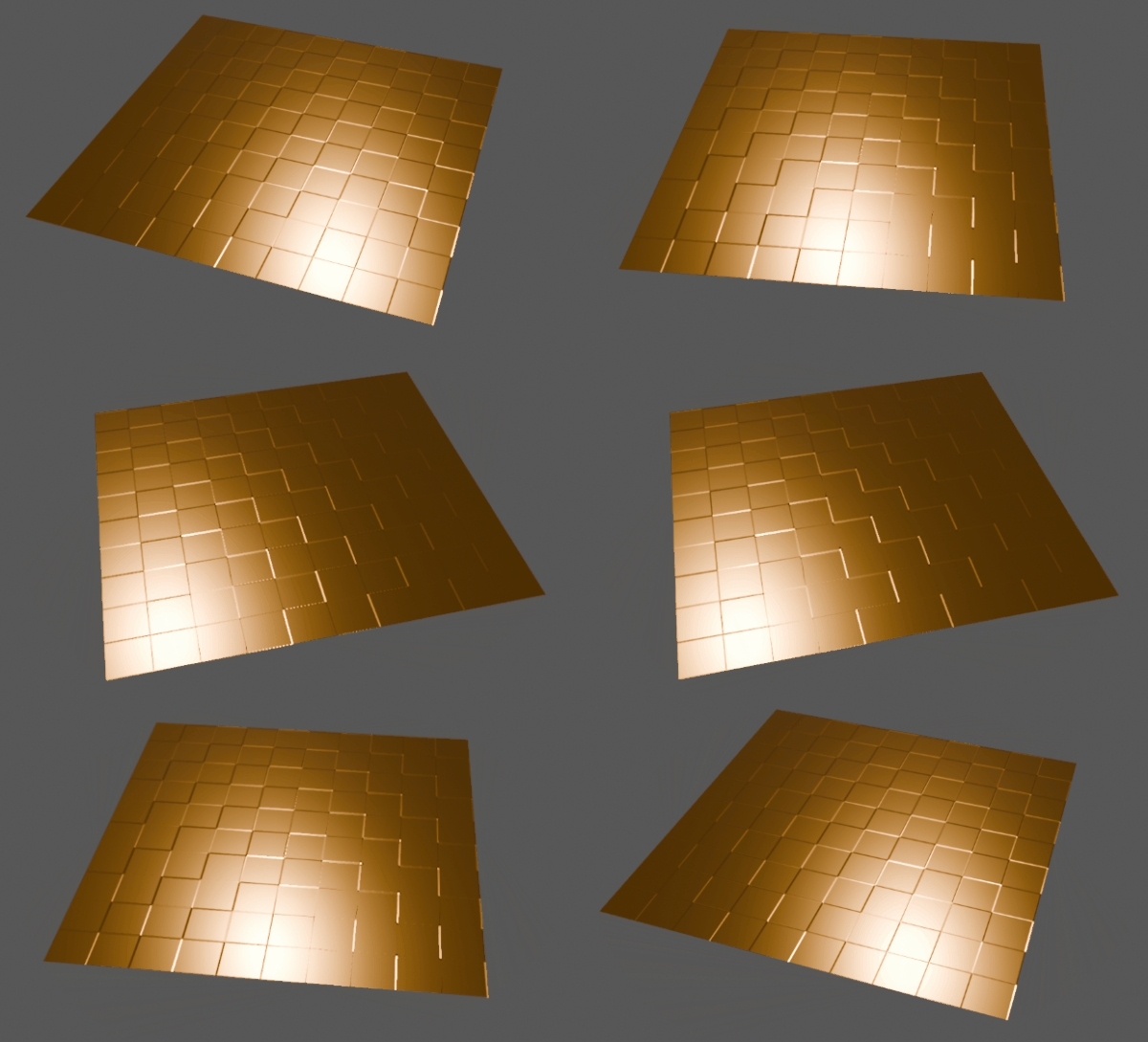
Here is a screenshot from a simple tile shader in Three.js and GLSL, where each 2×2 tiles have a bevel around them. The bevel is made entirely by modifying the normal vector in the fragment shader:

You have two options how to procedurally generate normals. Choose one of them (you do not have to implement both).
Option 1:
At each pixel, generate a “tilt vector” saying how much your original normal vector should be tilted. Since your homework is intended to work on a plane, you can even assume that the original normal vector is constant, so you can directly use the “tilt vector” as your normal vector.
Option 2:
At each pixel, generate a height offset. Assuming the original plane is at 0.0, having a height of 0.1 would mean the pixel is supposed to be 0.1 above the plane. You will not actually move the pixel! But if you know your current pixel’s height and the height of the neighborhood around it, you can approximate the normal vector from the height differences (remember how the normal vector is related to derivatives). Because your entire texture is procedural, you can compute the heights at any positions and approximate the normal.
Useful hints:
If you need the tangent vector, Three.js can precompute it for you:
const geometry = new THREE.PlaneGeometry(2, 2, 100, 100); // this line already exists
geometry.computeTangents(); // add this function call to pre-compute tangents
You can then explicitly declare the tangent vector in your vertex shader:
in vec4 tangent; // built-in: xyz = tangent direction, w = handedness (+1 or -1)
out vec3 vWorldNormal; // surface normal in world space
out vec3 vWorldTangent; // surface tangent in world space (U direction)
out vec3 vWorldBitangent; // surface bitangent in world space (V direction)
And in the vertex shader main() function, you can use:
// Transform the tangent frame into world space.
// The bitangent is reconstructed from the cross product; tangent.w carries
// the handedness sign needed to handle mirrored UV islands correctly.
mat3 m = mat3(modelMatrix);
vWorldNormal = normalize(m * normal);
vWorldTangent = normalize(m * tangent.xyz);
vWorldBitangent = normalize(cross(vWorldNormal, vWorldTangent) * tangent.w);
And similarly in the fragment shader, you can declare these vectors and they will be interpolated for you by WebGL. Keep in mind to properly normalize and orthogonalize everything like we discussed in the lecture.
Bonus (+25%)
To receive a bonus in this assignment, you can work on the following optional task.
In the GLSL version, implement displacement mapping. That means that you generate a height map (like in Option 2) but instead of using it in the fragment shader, you actually use it to offset the vertex coordinates in the vertex shader.
Keep in mind that in order for this to work, you need many vertices in your plane. In Three.js, the plane geometry constructor has arguments saying how much the plane should be subdivided (i.e., how many triangles the plane should consist of). Feel free to increase this number significantly.
Submission
Prepare the following:
- .html file with the Three.js/GLSL shader updated from Assignment 2
- .blend file with a simple plane with the assigned Blender material
- .md or .pdf report with:
- your material photos (or stating that you use the same as in Assignment 2)
- screenshots from Three.js and Blender
- brief explanation of how your shaders work
- declaration whether you used any AI assistants and how much of the work was your own
Upload these to a git repository under gitlab.mff.cuni.cz – each student will get a private repository created by me.
Deadline
Sunday, April 12, 23:59. Please ensure you have committed and pushed your changes by that time.
Grading
- You get 100% if you meet the full assignment instructions.
- You can get extra 25% bonus if you submit the bonus solution (see above).
- I will apply 50% deduction for each important requirement that was not followed.
Not yet released.
Not yet released.
Not yet released.